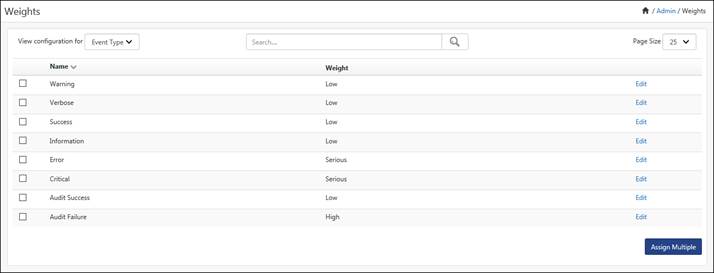
This option helps to assign weights to tags.
1 Log on to EventTracker Enterprise. Click the Admin, and then click Weights.
EventTracker displays the Weights page.
2 Select an option from the View configuration for drop-down list.
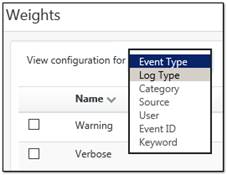
EventTracker displays the Weight configuration page with corresponding details.
3 Click Edit against the tag you wish to reassign the Weight.
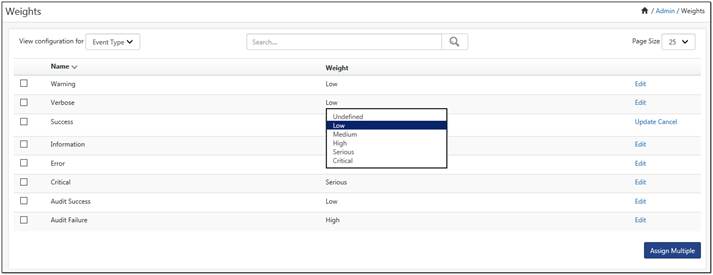
4 Select an appropriate option from the drop-down list in the Weight column and then click Update.
EventTracker updates the Tag with newly assigned weight.
This option helps you assign weights to multiple tags.
1 Select the checkbox against the tags you wish to assign weights and then click Assign Multiple.
EventTracker displays the Assign Weight pop-up window.
2 Select the required option from the Weightage drop-down list and then click Assign.

EventTracker assigns weights to the selected tags.
This option helps to add keywords as tags.
1 Select Keyword from the View configuration for drop-down list. Click Add new.
EventTracker displays the Add Keyword Weight pop-up window.
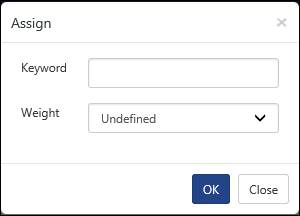
2 Type keyword in the Keyword field.
Example: Hardware Events
3 Select an option from the Weight drop-down list, and then click OK.
